
Upgrading your Ubuntu-on-Windows install to the app version

Canonical
on 3 August 2017
Our team and Microsoft recently released Ubuntu as a Windows app store application! 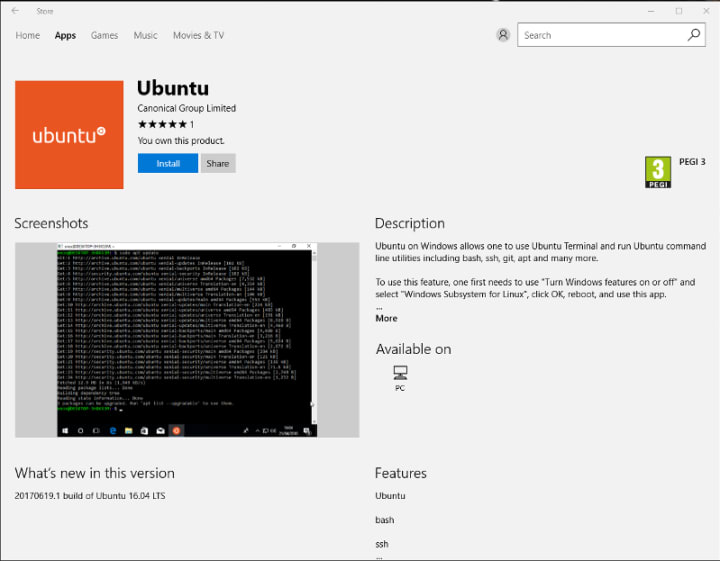 If you toyed with the “bash on Ubuntu on Windows” version before and would like to try the latest and greatest, read on!
Saving your data
If your “bash on ubuntu on windows” environment has some data you’d like to keep, make sure you back it up now. The uninstall process will nuke everything.
Uninstall the old way
This is relatively simple. Opening a command line (cmd.exe) terminal and typing
lxrun /uninstall
will destroy your previous environment.
Installing the new way
To find the app in the Microsoft store, just type “Ubuntu” in the search bar. Click install. Voilà!
Talk to us today
Interested in running Ubuntu in your organisation?
Newsletter signup
Related posts
MAAS installation: bare metal provisioning is easier than ever
MAAS brings cloud-like automation to physical servers. It helps teams discover, commission, deploy, and repurpose machines from a central control plane,...
Januscape vulnerability CVE-2026-53359 mitigations available
Introduction A local privilege escalation (LPE) vulnerability affecting the Linux kernel was publicly disclosed on July 6, 2026. The vulnerability was...
Managing Ubuntu on bare metal at scale
Modern infrastructure teams are expected to deliver cloud-like speed, consistency, and reliability, even when their workloads run on physical servers. Bare...